Printer Configurations
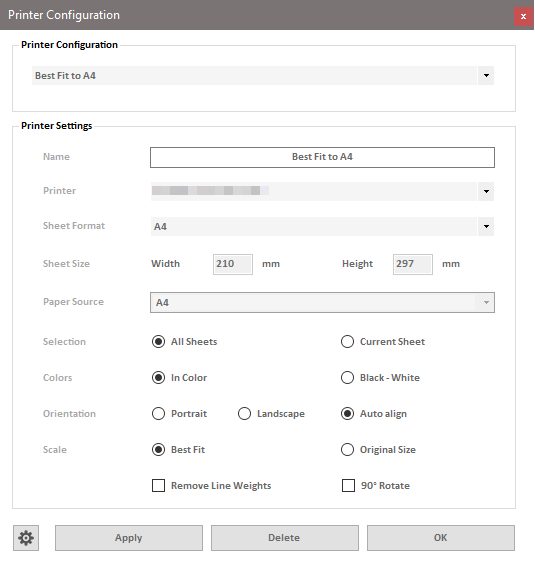
In the "Printer Configurations" dialog, you can create and delete various combinations of printers, paper sizes, and other settings as named printer configurations. The top menu contains all currently defined configurations.
Settings
Name
In this field, you can specify the name of the configuration. It is often useful to use descriptive names that express the function and key properties, such as "Plotter A2," "Office A4," etc.
Printer
This menu lists all the printer drivers available on your computer.
Paper Size
This menu contains all the paper sizes supported by the printer selected above.
Options
The print options in this dialog work similarly to the options in the print dialog of Inventor.
Orientation
The "Auto Adjust" option is recommended if you use both portrait and landscape format sheets. The program will automatically pass the required orientation of the sheets to the Inventor print manager, allowing the same configuration to be used for both portrait and landscape sheets.
Buttons
Settings Dialog (Gear icon) Opens the settings dialog of the multitool.
Apply
Saves the currently selected options under the specified name. If a configuration with the same name already exists, that configuration will be updated with the new settings. If there is no configuration with that name, the new configuration will be added to the list under that name.
Delete
Permanently deletes the currently selected configuration.
OK
Closes the dialog.